


Baby's Musical Hands
Milkbag Games
Installs
19 ratings
Category
Content Rating
4+
Developer
Milkbag Games
Version
1.2.1
Updated
Jun 26, 2017
Requires
iOS 8.0 or later
Price
$0.99
Size (iOS)
50.8 MB
Advertisement
Screenshots


Advertisement
Editor Reviews
Baby's Musical Hands is a music game developed by Milkbag Games for iPhone & iPad. It holds an average rating of 4.3 out of 5 from 19 players.
Baby's Musical Hands is a paid game ($0.99). The latest version 1.2.1 was released on Jun 26, 2017. Content rating: 4+.
Advertisement
About Baby's Musical Hands
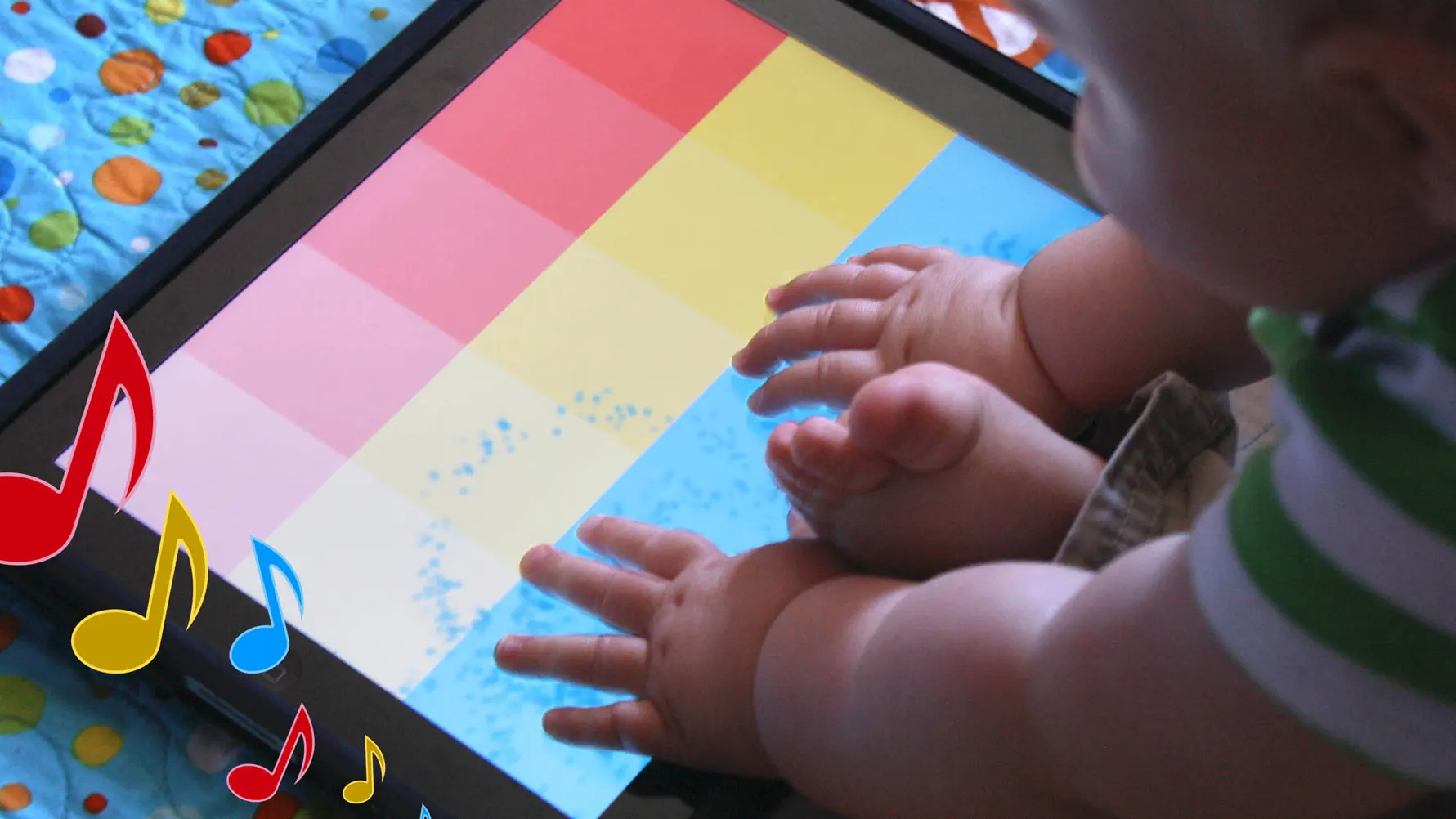
Baby's Musical Hands is an award-winning musical toy for babies and toddlers for the iPad, iPhone, and iPod touch.
As a game designer and developer, I love my iOS devices. But as a new father, I realized how much my son loves them too. I decided I could put my experience developing for iOS to use, and build an app for my son to play with. Baby's Musical Hands was born!
--= Awards for Baby's Musical Hands =--
Best Infant App (iOS) - 2011 Best App Ever Awards
Editor's Choice Award - Children's Technology Review
--= Reviews for Baby's Musical Hands =--
"Baby's Musical Hands Is a Magical App" - GeekDad - Wired.com
"Baby's Musical Hands is a great choice to increase the understanding of cause and effect in the youngest app users" - GiggleApps
"...any kid would find the fun in this one" - TUAW
Baby's Musical Hands features 15 brightly colored squares that your baby can touch. Red squares make drum sounds, yellow squares play piano notes, and blue squares play guitar notes.
Every time your baby touches the screen, colorful stars will burst from their fingers. Watch them delight in the audio and visual feedback!
Baby's Musical Hands supports full multi-touch, meaning your baby gets the kind of feedback they expect when touching the screen.
I'd love to hear from you if your son or daughter loves Baby's Musical Hands as much as mine!
Please like the Baby's Musical Hands facebook page to stay up to date on what's new with the app: http://www.facebook.com/BabysMusicalHands
Owen Goss
Father
Founder, Streaming Colour Studios
==========
TIP: In iOS 6 or later, you can use your device's Accessibility options to disable the home button, so your child won't accidentally quit Baby's Musical Hands:
- Open your iPhone or iPad's Settings app
- Tap on: General > Accessibility > Guided Access
- Turn Guided Access on
- Set a Passcode (remember what this is)
- Press the Home button to quit the settings app
- Open Baby's Musical Hands
- Triple-click the Home button
- Tap "Start" in the top-right corner of the screen
- The Home button is now disabled
When you are ready to quit Baby's Musical Hands:
- Triple-click the Home button
- Enter your Passcode
- Tap "End" in the top-left corner of the screen
- Press the Home button to quit the app
What's New
Update with fixes in preparation for iOS 11. Thank you so much for your continued support of Baby's Musical Hands!
How to download Baby's Musical Hands?
- Tap the Google Play button (Android) or the App Store button (iPhone / iPad) in the download section.
- The official store page of Baby's Musical Hands opens in a new tab.
- Tap Install or Get and wait until the download finishes.
- Open Baby's Musical Hands from your home screen and start playing.
FAQ
Is Baby's Musical Hands free to play?
No, Baby's Musical Hands is a paid game. Current price: $0.99.
Is Baby's Musical Hands available for iPhone?
Yes, Baby's Musical Hands is available on the Apple App Store and needs iOS 8.0 or later.
Is it safe to download Baby's Musical Hands?
Yes. ER Games does not host any files — the download buttons open the official Google Play and App Store pages.
Download the App
Similar Games
Magic Tiles 3™ - Piano Game
Tiles Hop Music & Ball Game
Piano Kids - Music & Songs
My Singing Monsters
Music Piano 7: Tiles Song Game
Piano Star
Real Drum electronic drums set
Piano Fire: Edm Music & Piano
Piano Game: Classic Music Song
Just Dance Now
Guitar Band: Rock Battle
Magic Dancing Tiles
Music Ballz Hop
Real Piano
Real Guitar - Music Band Game
Advertisement
Disclaimer
1. ER Games does not represent any developer, nor is it the developer of any app or game listed on this website.
2. Game details such as icons, screenshots, ratings and descriptions are collected from the public Google Play and App Store listings so players can compare games before installing.
3. All trademarks, registered trademarks, product names, company names and logos are the property of their respective owners.
4. ER Games does not host APK or IPA files. Every download button opens the official Google Play Store or Apple App Store page of the game.
5. ER Games respects the Digital Millennium Copyright Act (DMCA). If you are the owner of any content shown here and want it removed, please contact us at contact@earningreview.com.